

How to build a custom HSK vocabulary list
Website
Choose the words you need across HSK source pages, then make one study set. The HSK builder can export the same selection for paper, Anki and Laowai.
Choose the source edition before the words
Start with the HSK vocabulary catalogue. It separates the official-source HSK 2.0 and HSK 3.0 lists. Level names are meaningful only alongside the edition, so check both before choosing a download.
New-entry sets contain words introduced at that source level. Cumulative sets combine the vocabulary through that level. Use the edition comparison if a book and a word list seem to disagree.
If you are preparing for a booked test, confirm the syllabus with the test centre. The app’s HSK course path, a source vocabulary list and an exam paper are different learning resources.
Collect the words you actually need
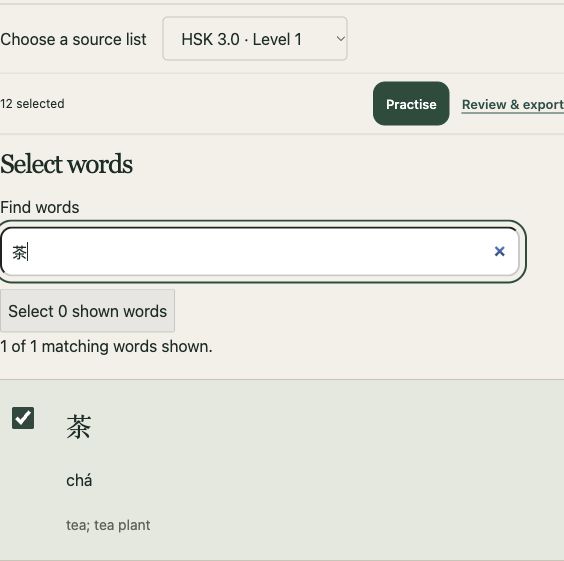
- Use the selection checkboxes on HSK source pages to add words.
- Open the set builder to inspect the combined selection.
- Remove familiar or irrelevant words and check the source labels.
- Choose the output format for your next activity.
The builder supports up to 200 selected words across pages and editions. Its selection is saved in this browser. It is separate from your account’s personal vocabulary lists.
For one lesson, a small set with a shared purpose can be easier to use than an entire level. Select words for a restaurant conversation, for example, then make a recall activity and a printable reference from the same set.
Match the output to the task
| Your next task | Choose |
|---|---|
| Read a reference list | PDF word list |
| Write characters | Hinted or recall writing sheets |
| Practise on paper | Printable flashcards or sentence worksheets |
| Study in Anki | APKG deck |
| Practise in web Study | Save and practise |
| Transfer a native Laowai list | .laowailist export and import preview |
For printed material, choose A4 or Letter to match the paper in your printer. Check the preview before printing a class set. Recall sheets have a separate answer key so the prompt stays useful.
Move from a selected set to regular practice
- Open the HSK set builder and check the selected edition, words and readings.
- Choose Save and practise (or Practise in the selected-words bar). If a spelling has more than one dictionary reading or meaning, choose the entry you intend to practise.
- Open the saved list in Study. Its review history is shared with the same dictionary entries in your other lists.
No file transfer is needed for web Study. For the native app, you can instead download .laowailist and review the import preview, or use an available app-list link. These are separate actions from account sync.
The builder’s browser selection and a saved personal list serve different purposes. Save the selection to My lists to keep practising it on the web. Export the selection when you need a file, paper activity or Anki deck. Merely selecting, saving or exporting a word does not record a correct answer or mastery.
Use the seven thematic starter sets when you want a ready-made activity with examples and exercises. They are a fixed collection of lessons rather than a personalised queue of reviews due today.